Automatic payments
Fluxir can use a tenant's saved payment method to automatically collect eligible service application charges. A billing administrator configures the method once in the Travel Agencies Portal. After that, an API integration can continue its normal service application workflow without sending a traveler or API client through a portal checkout for every charge.
Automatic payment is an option in the existing billing workflow, not a guarantee that every charge will succeed. Fluxir checks the payment configuration when a charge is due, and the payment provider can still decline or delay a payment.
Configure a payment method
- Sign in to the Travel Agencies Portal as a user authorized to manage billing for the tenant.
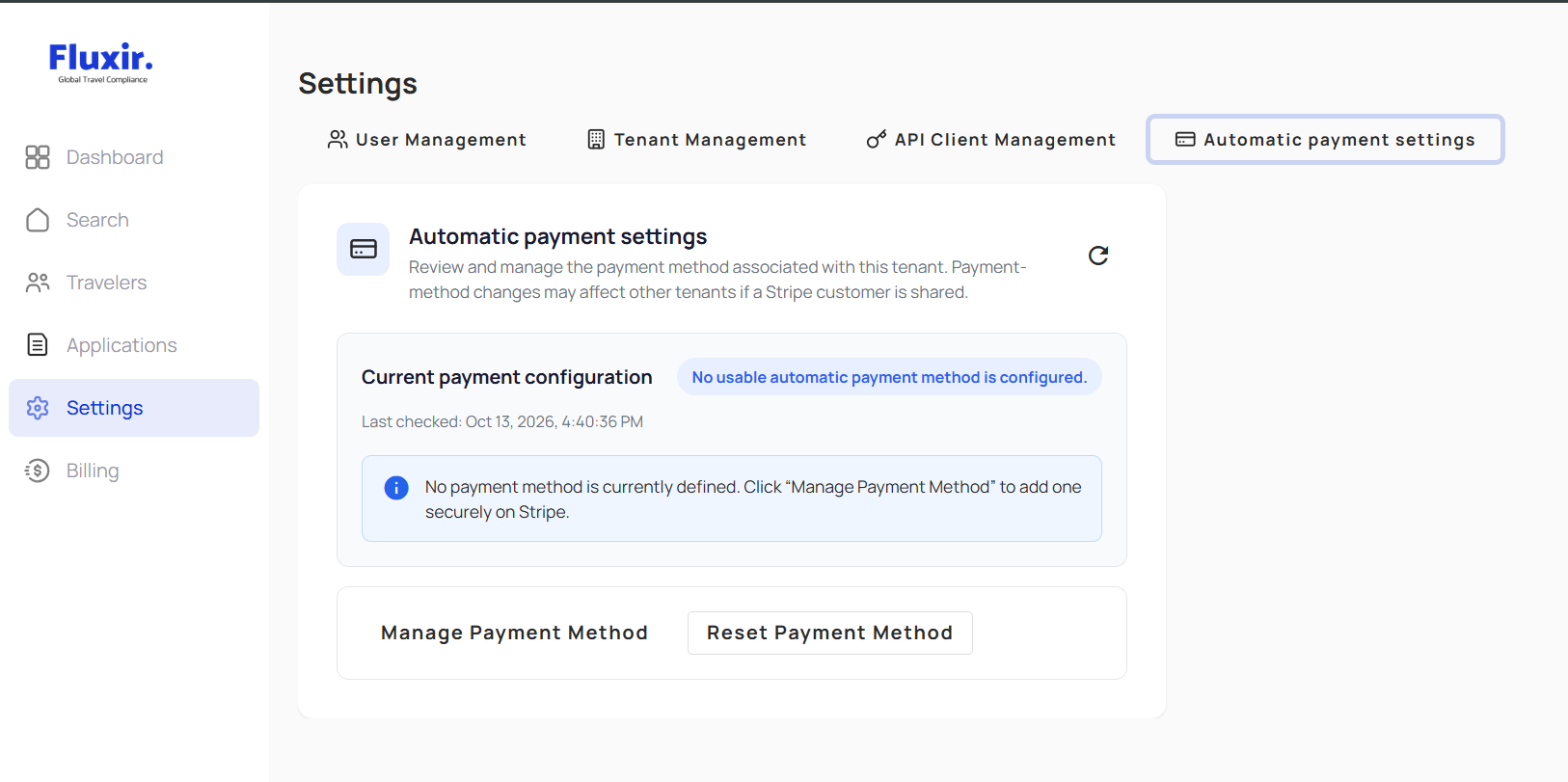
- Open Settings and select Automatic Payments.
- Review the current configuration status. Select Manage Payment Method to open the hosted payment setup or management flow.
- Complete the requested setup and verification steps in the hosted flow, then return to Fluxir.
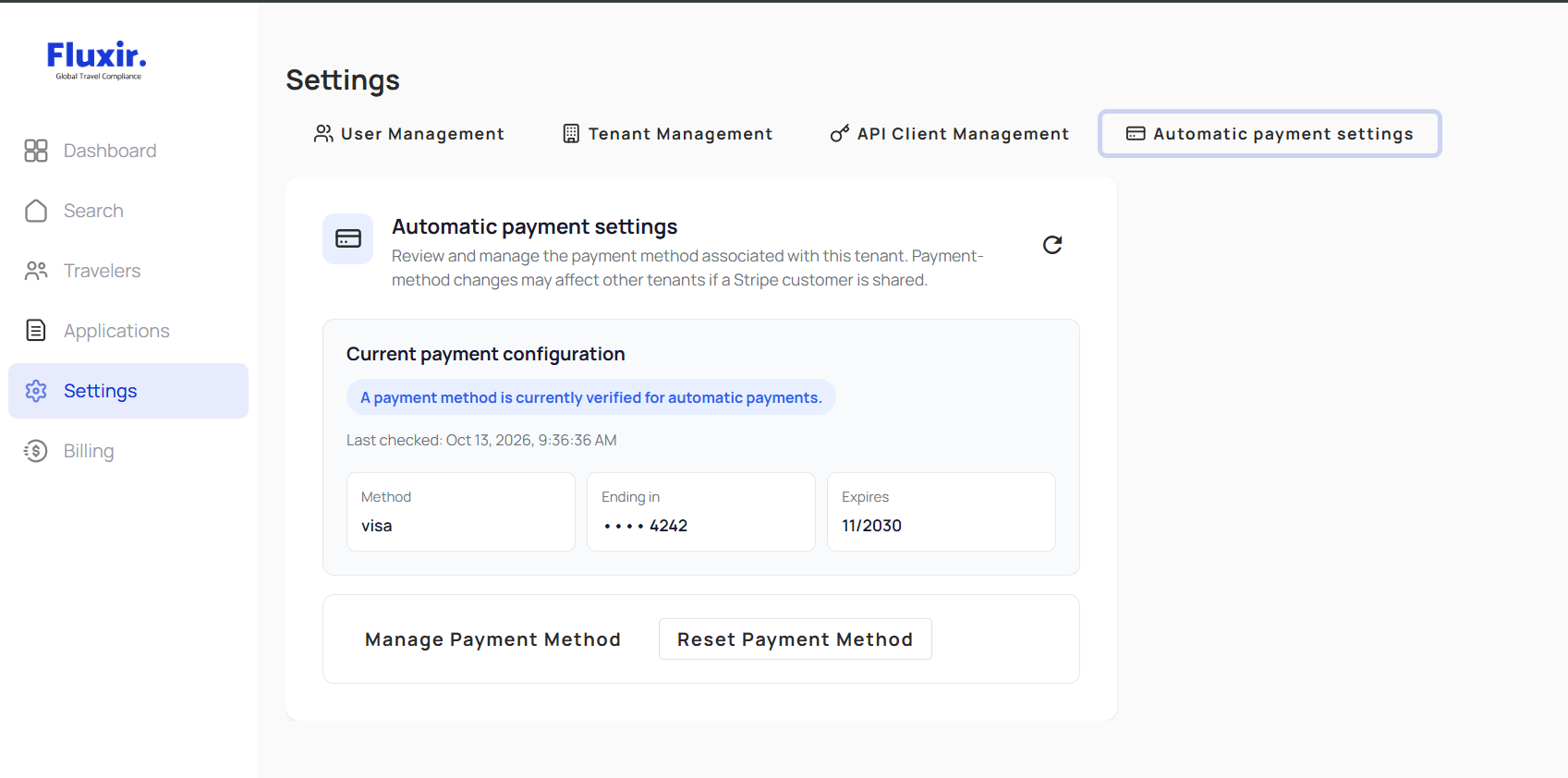
- Confirm that the method is shown as Usable. Use Refresh if the status has not updated yet.
The page displays a limited method summary, such as the method type, brand, and last four digits. It does not display full payment details.
Understand the configuration status
| Status | Meaning |
|---|---|
| Missing | No automatic payment method is configured for the tenant. |
| Verification pending | Setup or verification is not complete yet. |
| Usable | Fluxir has verified the saved method for automatic payment. A later charge may still be declined or delayed. |
| Needs update | The saved method cannot currently be used. An authorized user should update or replace it. |
| Temporarily unverified | Fluxir could not confirm the method's current status. Refresh later or contact the billing administrator if the status persists. |
Only a currently verified, usable method can be selected for an automatic charge. A browser redirect back from the hosted setup flow by itself does not confirm that setup is complete.
Use automatic payments with the API
Automatic payment configuration belongs to the tenant, not to an individual Trip or Service Application. This is useful for headless integrations: an authorized user sets up the tenant's payment method in the portal, and the API client continues creating and submitting Service Applications through its existing workflow.
When a Service Application reaches the payment workflow, Fluxir checks the tenant's current billing configuration. Available tenant balance may be applied first; when an external charge is needed, Fluxir can use the tenant's verified automatic payment method. If automatic payment is unavailable, other billing options depend on the tenant's billing arrangement.
The public API reference does not currently provide an endpoint for setting up or managing this payment method. Do not send payment card or bank details through Service Application API requests. To use automatic payments:
- Ask the tenant's billing administrator to configure and verify a method in Settings → Automatic Payments.
- Continue using your existing authentication, tenant context, and Service Application API workflow.
- Check billing readiness before paid API work. That readiness result is advisory; it does not report whether an automatic payment method is usable or guarantee that a charge will be approved.
For the broader API submission sequence, see Creating a New Trip.
If a charge does not complete
A saved method does not guarantee provider approval. A payment can remain pending, fail, or require the tenant to update its method. Check the Service Application's current status and payment feedback before taking action. If the result is pending or uncertain, do not submit the same payment again just because a request timed out; ask the tenant's billing administrator or Fluxir support to confirm the payment outcome first.
If the configuration shows Needs update or remains Temporarily unverified, have an authorized billing administrator review it in Settings → Automatic Payments. Interactive checkout and other billing arrangements may still be available according to the tenant's configuration.